
Distributor Quote Analytics
Filters

Filtering the Dashboard
High Level Performance
Overview
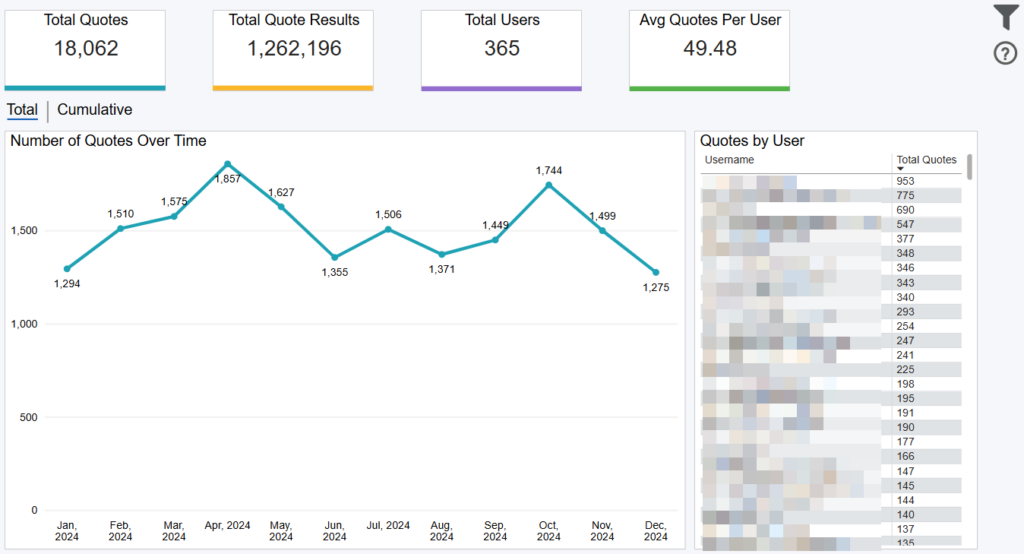
This dashboard displays your total number of quotes, quote results, users, average number of quotes per user and a monthly trend of quotes over time. Choose the Filter icon in the top right to refine your results.
Exporting Data
Click the “Quick Actions” dropdown in the top right of your screen to send this information to your email. Choosing “Export” will immediately send an email with a file attachment. This email is tied to your InsureSight username.
Choosing “Schedule” will allow you to set up a recurring email to be delivered on the schedule you choose. To modify this schedule, click the “Settings” option in the far-left navigation menu under “InsureSight.”
User Detail Report

Overview
This dashboard displays a detailed report of all quotes for each user, along with some user details.
Choose the Filter icon in the top right to refine your results.
Exporting Data
Click the “Quick Actions” dropdown in the top right of your screen to send this information to your email. Choosing “Export” will immediately send an email with a file attachment. This email is tied to your InsureSight username.
Choosing “Schedule” will allow you to set up a recurring email to be delivered on the schedule you choose. To modify this schedule, click the “Settings” option in the far-left navigation menu under “InsureSight.”
Quote Detail Report
Dashboard Overview
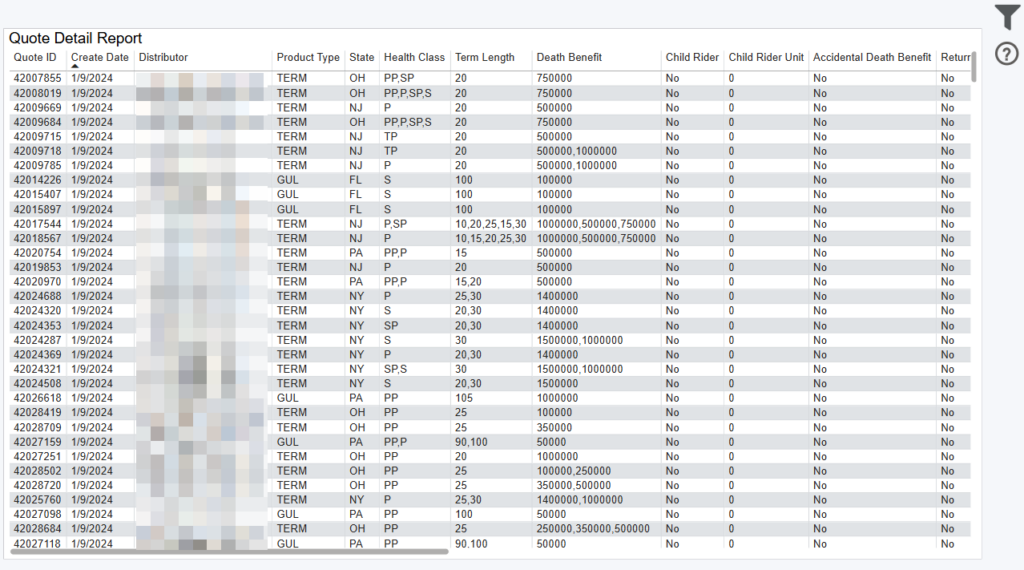
This dashboard displays a detailed report of all quotes.
Choose the Filter icon in the top right to refine your results.
Data Definitions
Health Class Definitions:
- PP – Preferred Best
- P – Preferred Non-Smoker
- TP – Preferred Smoker
- TS – Standard Smoker
- S – Standard Non-Smoker
- SP – Standard Plus Non-Smoker
Exporting Data
Click the “Quick Actions” dropdown in the top right of your screen to send this information to your email. Choosing “Export” will immediately send an email with a file attachment. This email is tied to your InsureSight username.
Choosing “Schedule” will allow you to set up a recurring email to be delivered on the schedule you choose. To modify this schedule, click the “Settings” option in the far-left navigation menu under “InsureSight.”
