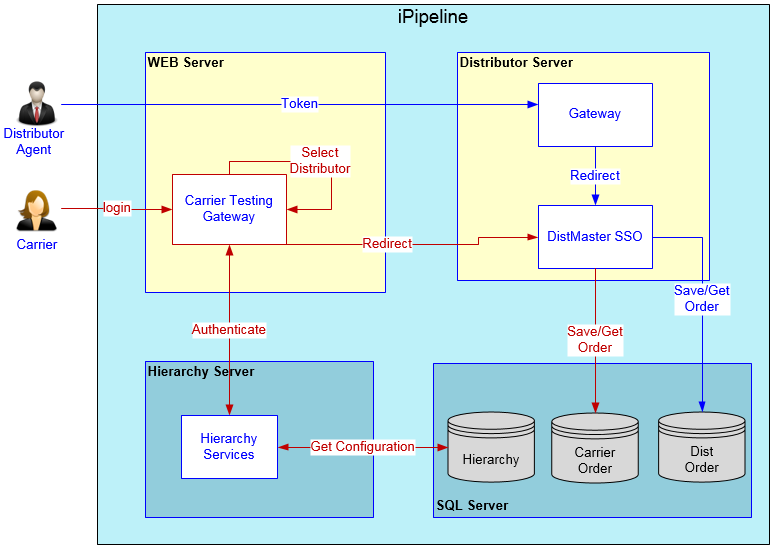
Carrier Testing as Distributor
Carrier users can test products in the distributor environment to have a similar experience as that distributor’s agents. If this configuration is enabled, a Carrier user can log into a distributor site via a username and password login to create an order and select a product as the distributor would.
Notes the following components/features are not available to carriers using carrier test as distributor functionality:
- Distributor self-service/suitability questions
- E-signature functionality
- Approval queue workflow processing
- DTCC APP/SUB generation and transmission
Carriers will be able to see/test
- Distributor specific configurations with respect to their customizations except for features/components indicated as out of scope
- Distributor business rules and screen layout configurations
- Carrier questions as displays to the target distributor.
- Carrier forms as generated and populated with the target distributor environment.
- Ability for carrier to download APP/SUB from Summary screen using target distributor code base.
- Validate netting etc.
The below diagram provides an overview of a carrier user login and redirection.
Note: There may be a cost associated with this feature. This feature is available for all annuity clients on Fall 2019 Release or later.